
Use Mermaid.js in Markdown Editor: Complete Guide
Learn how to create stunning diagrams and flowcharts in mdedit.ai using Mermaid.js. Step-by-step guide with examples for sequence diagrams, flowcharts, and more.
Mermaid.js lets you create diagrams using text instead of dragging boxes around in a visual editor. It's basically "diagrams as code," which means you can version control them, diff them in PRs, and keep them right next to your documentation.
mdedit.ai has Mermaid built in: just write a code block with the mermaid language, and it renders automatically. Here's what you can create with it.
Table of Contents
- Sequence Diagrams
- Flowcharts
- State Diagrams
- Class Diagrams
- Entity Relationship Diagrams
- Gantt Charts
- Pie Charts
- Export Your Diagrams
- Frequently Asked Questions
mdedit.ai now supports Mermaid.js diagrams. Mermaid is a JavaScript-based diagramming and charting tool that renders Markdown-inspired text definitions to create and modify charts dynamically.
Now you can use mdedit.ai to add diagrams using Mermaid.js while writing with mdedit.ai. Just like any other code block add a code snippet with the language set as mermaid. Let's explore various types of diagrams you can create!
Sequence Diagrams
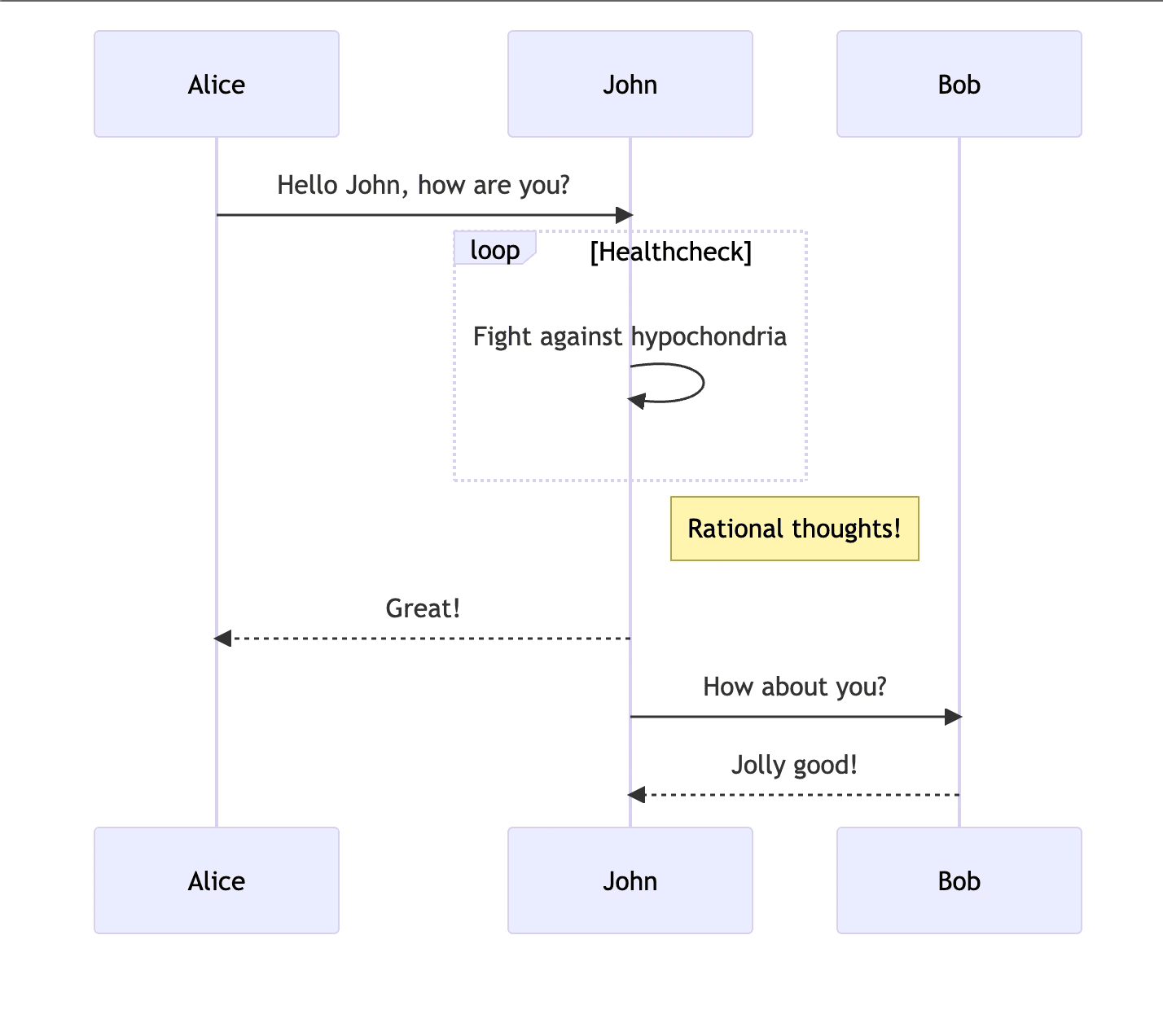
Sequence diagrams are perfect for visualizing interactions between different actors or systems. For example:
sequenceDiagram
Alice->>John: Hello John, how are you?
loop Healthcheck
    John->>John: Fight against hypochondria
end
Note right of John: Rational thoughts!
John-->>Alice: Great!
John->>Bob: How about you?
Bob-->>John: Jolly good!
The above code snippet produces the following diagram as output:
Flowcharts
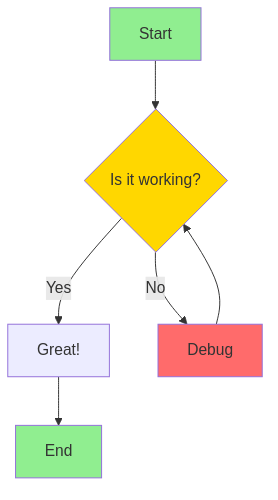
Flowcharts help visualize processes and decision points. You can also add custom styling to make your diagrams more visually appealing:
graph TD
    A[Start] --> B{Is it working?}
    B -->|Yes| C[Great!]
    B -->|No| D[Debug]
    D --> B
    C --> E[End]

    style A fill:#90EE90
    style E fill:#90EE90
    style B fill:#FFD700
    style D fill:#FF6B6B
State Diagrams
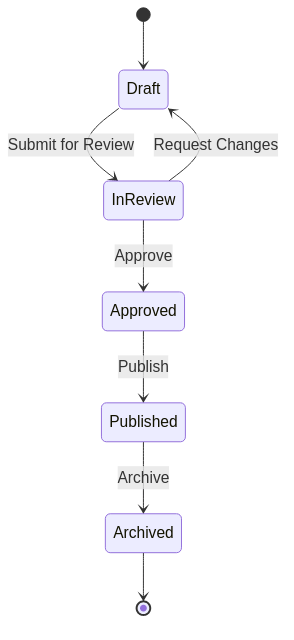
State diagrams are excellent for modeling workflows and state transitions:
stateDiagram-v2
    [*] --> Draft
    Draft --> InReview: Submit for Review
    InReview --> Approved: Approve
    InReview --> Draft: Request Changes
    Approved --> Published: Publish
    Published --> Archived: Archive
    Archived --> [*]
Class Diagrams
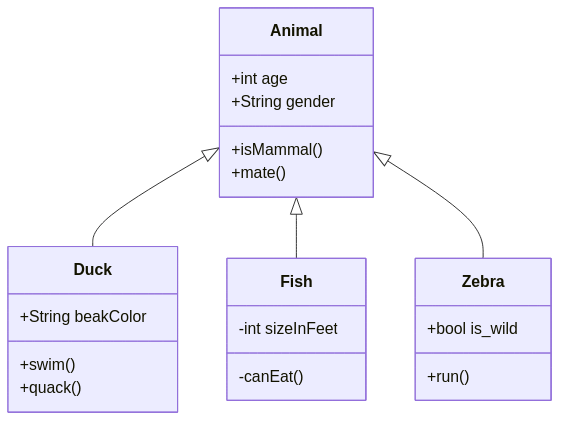
Class diagrams help visualize object-oriented system structures:
classDiagram
    Animal <|-- Duck
    Animal <|-- Fish
    Animal <|-- Zebra
    Animal : +int age
    Animal : +String gender
    Animal: +isMammal()
    Animal: +mate()
    class Duck{
        +String beakColor
        +swim()
        +quack()
    }
    class Fish{
        -int sizeInFeet
        -canEat()
    }
    class Zebra{
        +bool is_wild
        +run()
    }
Entity Relationship Diagrams
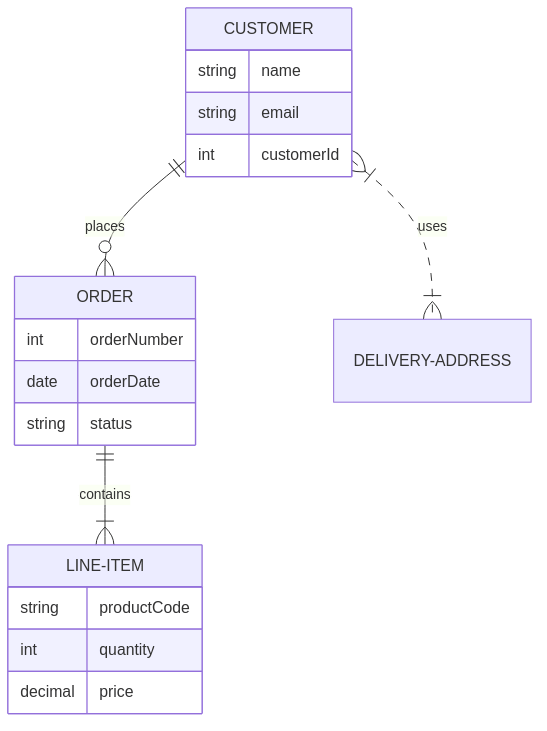
ER diagrams are perfect for modeling database relationships:
erDiagram
    CUSTOMER ||--o{ ORDER : places
    ORDER ||--|{ LINE-ITEM : contains
    CUSTOMER }|..|{ DELIVERY-ADDRESS : uses

    CUSTOMER {
        string name
        string email
        int customerId
    }
    ORDER {
        int orderNumber
        date orderDate
        string status
    }
    LINE-ITEM {
        string productCode
        int quantity
        decimal price
    }
Gantt Charts
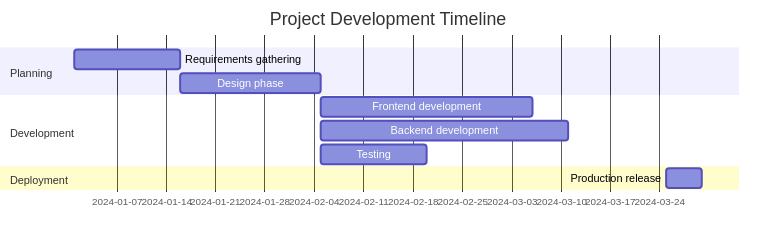
Gantt charts are ideal for project planning and timeline visualization:
gantt
    title Project Development Timeline
    dateFormat YYYY-MM-DD
    section Planning
        Requirements gathering :a1, 2024-01-01, 15d
        Design phase          :a2, after a1, 20d
    section Development
        Frontend development  :2024-02-05, 30d
        Backend development   :2024-02-05, 35d
        Testing              :after a2, 15d
    section Deployment
        Production release    :2024-03-25, 5d
Timeline Diagrams
Timeline diagrams are perfect for release notes and project milestones. Start your Mermaid block with timeline:
timeline
    title Mermaid timeline in Markdown
    2024 : Draft
    2025 : Review
    2026 : Publish
For more examples (including timeline syntax), see the docs: Mermaid Diagrams in mdedit.ai Docs.
Pie Charts
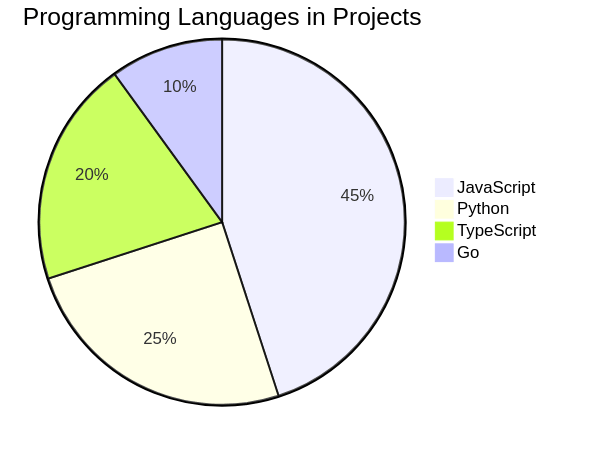
Pie charts are great for displaying proportional data:
pie title Programming Languages in Projects
    "JavaScript" : 45
    "Python" : 25
    "TypeScript" : 20
    "Go" : 10
Export Your Diagrams
When you export your work using one of the supported formats, it will contain the rendered diagram. mdedit.ai supports exporting to PDF, HTML, DOCX, and more.
If you need to check or export standalone Mermaid source for slides, READMEs, and docs, use these tools:
Need to edit and export a full technical document (not just a diagram)? Use the mdedit.ai scratchpad to write Markdown with Mermaid previews: https://app.mdedit.ai/scratchpad Or compare plans: https://mdedit.ai/pricing
Frequently Asked Questions
How do I add a Mermaid diagram to my Markdown document?
Create a code block with mermaid as the language identifier, then write your diagram syntax inside. mdedit.ai will automatically render it in the preview. For example:
```mermaid
graph TD
    A[Start] --> B[End]
```
Can I customize colors and styles in Mermaid diagrams?
Yes! Mermaid supports custom styling using CSS-like syntax. Add style definitions directly in your diagram code:
graph TD
    A[Styled Node]
    style A fill:#f9f,stroke:#333,stroke-width:4px
Are Mermaid diagrams supported on GitHub?
Yes! GitHub, GitLab, Notion, and many other platforms have native Mermaid support. Your diagrams will render automatically when you push Markdown files with Mermaid code blocks to these platforms.
What types of diagrams can I create with Mermaid?
Mermaid supports: flowcharts, sequence diagrams, class diagrams, state diagrams, entity relationship diagrams (ERD), Gantt charts, pie charts, user journey maps, and more. Check the complete diagrams guide for all options.
How do diagrams look when exported to PDF?
When you export to PDF, HTML, or DOCX, Mermaid diagrams are automatically rendered as high-quality PNG images and embedded in your document. The output looks professional and print-ready.
Can I create interactive diagrams with Mermaid?
In web-based environments (like the mdedit.ai preview or HTML exports), some Mermaid diagrams support interactivity like tooltips and click events. However, static exports (PDF, DOCX) render diagrams as images without interactivity.
What's the syntax for creating a sequence diagram?
Use sequenceDiagram as the diagram type, define participants, then use arrows (->> for calls, -->> for returns) to show interactions:
```mermaid
sequenceDiagram
    Alice->>Bob: Hello!
    Bob-->>Alice: Hi there!
```
Can I include Mermaid diagrams in technical documentation?
Absolutely! Mermaid is perfect for technical documentation. Use it for architecture diagrams, API workflows, database schemas, state machines, and project timelines. The text-based format makes diagrams version-controllable alongside your code.
How do I debug Mermaid syntax errors?
The mdedit.ai preview will show error messages if your Mermaid syntax is invalid. Common issues include typos in keywords, unbalanced labels, or invalid relationships. Start with the Mermaid validator to isolate the source, then use the Mermaid Live Editor if you need a second rendering environment.
Can I nest or combine multiple Mermaid diagrams?
While you can't nest diagrams within a single code block, you can include multiple separate Mermaid code blocks in your document. Each will render independently, allowing you to create comprehensive visual documentation.
Related Articles
- Complete Guide to Diagrams in Markdown - Learn Graphviz, DOT, and Markmap too
- AI-Powered Markdown Editor for Tech Writers - Explore all mdedit.ai features
- Markdown Tips and Tricks - Master Markdown syntax
Give It a Shot
The syntax takes a few tries to get comfortable with, but once you do, it's way faster than using a visual editor. And you get all the benefits of text-based diagrams: version control, easy updates, and no proprietary file formats.
For more examples:
- mdedit.ai Mermaid Documentation - Interactive examples
- Mermaid.js Official Docs - Complete reference
Try it in mdedit.ai (no signup needed) and see if it fits your workflow.