
What is Markdown?
Markdown is readable plain text that uses simple symbols to add structure and formatting.
By Vivek Maskara · Last updated
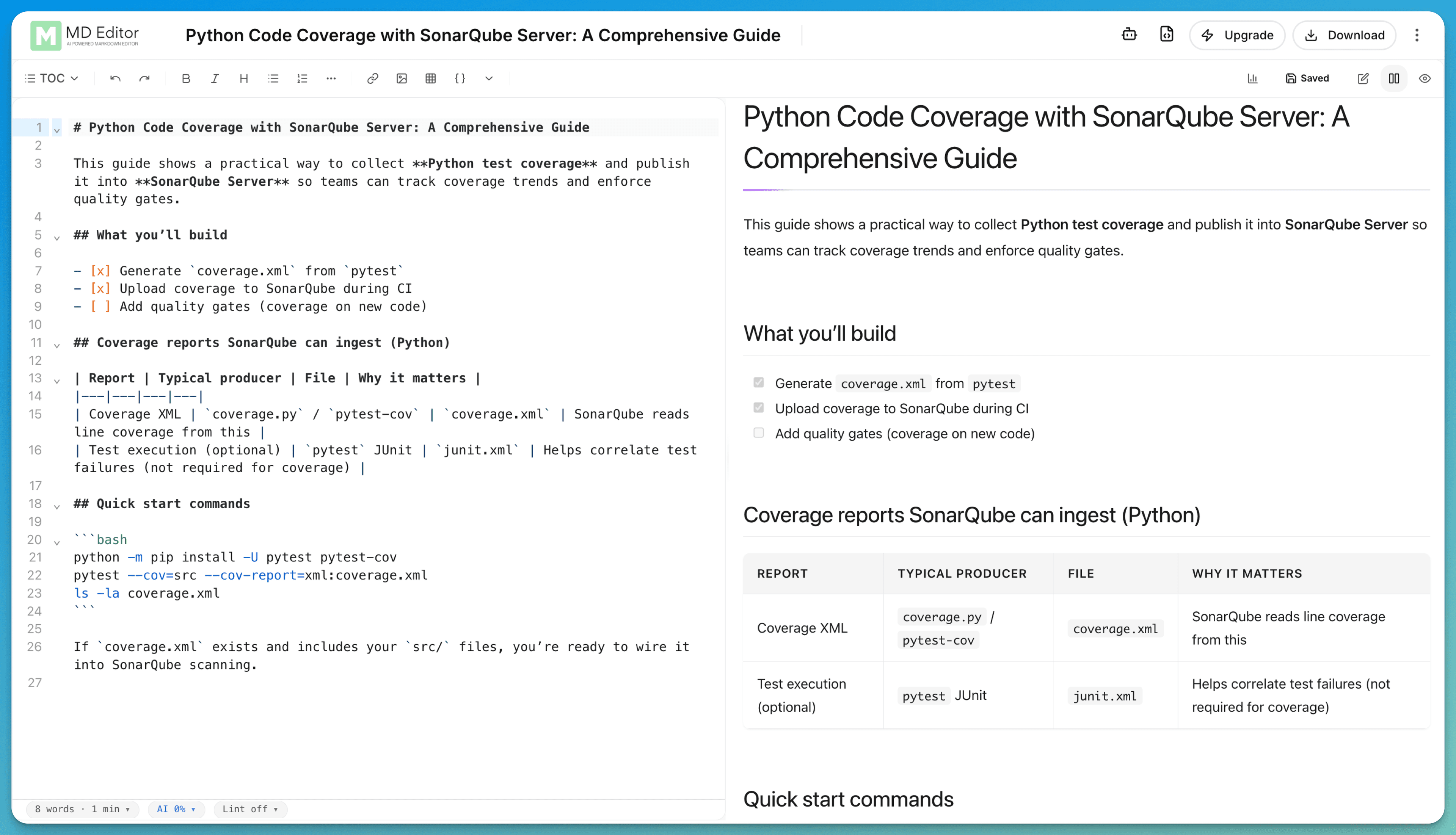
A plain-text format with visible structure
In a rich-text editor, formatting is usually stored behind the document you see. In Markdown, the formatting instructions stay in the text. A line that begins with # is a heading, and text wrapped in ** is bold.
The source remains readable before it is rendered. That makes Markdown useful for documentation, README files, notes, technical articles, issue descriptions, and content stored in version control.
The short version
Markdown adds formatting with ordinary text characters, while keeping the original source portable and readable.
What is a .md file?
It is a plain-text file that uses Markdown syntax. The extension tells compatible apps how to render it. Below is a typical README.md. Change the source and the rendered page updates as you type.
Nothing leaves this page. No sign-up, no upload.
Open the editorOpen anywhere
Any plain-text editor can open the source, even if it does not render the formatting.
Preview when needed
A Markdown viewer turns the source into a readable page without changing the file.
Track clean changes
Because the file is text, version-control systems can show exactly which lines changed.
Core Markdown syntax
These are the patterns you will use most. The docs carry the full reference and the platform-specific extensions.
# Project notes**important**[mdedit.ai](https://mdedit.ai)- First item
- Second item- First item
- Second item
`npm run build`npm run build> Keep the source readable.Keep the source readable.
Markdown compared with rich text
Both can produce formatted documents, but they store and expose that formatting differently.
How is formatting stored?
- Markdown
- Visible symbols in plain text
- Rich text
- Formatting data managed by the editor or file format
Can any text editor open it?
- Markdown
- Yes
- Rich text
- Not always, especially for binary document formats
Is the raw source readable?
- Markdown
- Usually
- Rich text
- Depends on the storage format
Is layout control comprehensive?
- Markdown
- No, it favors common document structure
- Rich text
- Often broader and more visual
Open, edit, or preview a Markdown file
Every option below opens the same plain-text file.
To read it
Open the file in a text editor for the raw source, or paste it into the online Markdown viewer for a formatted preview.
To change it
Use any text editor, or open the editor to write with a live preview. Already have a Word doc or a PDF? See how to convert a file to Markdown.
To learn more syntax
Keep the detailed reference open in the Markdown features docs.
Weighing more than one tool? Read the Markdown editor comparisons before you settle on one.
Markdown questions
Markdown is a lightweight markup language. You add small, readable symbols to plain text, then a Markdown renderer turns those symbols into headings, links, lists, code blocks, and other formatted content.
A .md file is a plain-text file whose content is written in Markdown. README.md is a common example. You can open the source in any text editor or use a Markdown viewer to see the rendered formatting.
No. Markdown is a smaller, more readable authoring syntax. A Markdown processor commonly converts it to HTML for display, but Markdown does not expose the full structure and styling controls available in HTML.
Not always. Core syntax is widely shared, but platforms can add extensions. GitHub Flavored Markdown, the variant used on the GitHub code-hosting platform, adds features such as tables, task lists, autolinks, and strikethrough. Check the target platform when exact rendering matters.
Turn Markdown into a document
Open the editor in mdedit.ai, write the source, and watch the preview keep up.