Skip to content

Document workflow or connected knowledge base?

mdedit.ai vs Obsidian for Markdown documents

Obsidian is the better home for a linked personal knowledge base you keep on your own disk, and mdedit.ai is the better home for a technical document that has to be reviewed, exported, and published.

By Vivek Maskara · Last updated

mdedit.ai

Choose mdedit.ai when

You want a browser entry point, live same-document collaboration, explicit review states, technical-content export, or publishing workflows.

Try mdedit.ai without sign-up
Obsidian

Choose Obsidian when

You are building a private, linked knowledge base from local Markdown files and want Obsidian’s vault model and plugin ecosystem.

Visit Obsidian

At a glance

  • Runs in the browser

    mdedit.ai

    Yes, no sign-up needed

    Obsidian

    No browser editor documented

  • Local Markdown files

    mdedit.ai

    Yes, on desktop

    Obsidian

    Yes, in a local vault

  • Live co-editing

    mdedit.ai

    Yes, same document

    Obsidian

    Not supported, per official help

  • Backlinks and graph

    mdedit.ai

    No

    Obsidian

    Yes, plus Canvas and plugins

  • Publishing

    mdedit.ai

    Hosted links and destinations

    Obsidian

    Publish is a paid add-on

  • Price

    mdedit.ai

    Free tier, paid from US$6.99 a month

    Obsidian

    Free core app, paid add-ons

  • Platforms

    mdedit.ai

    • Web
    • macOS
    • Windows
    • Linux

    Obsidian

    • Desktop
    • Mobile

See them side by side

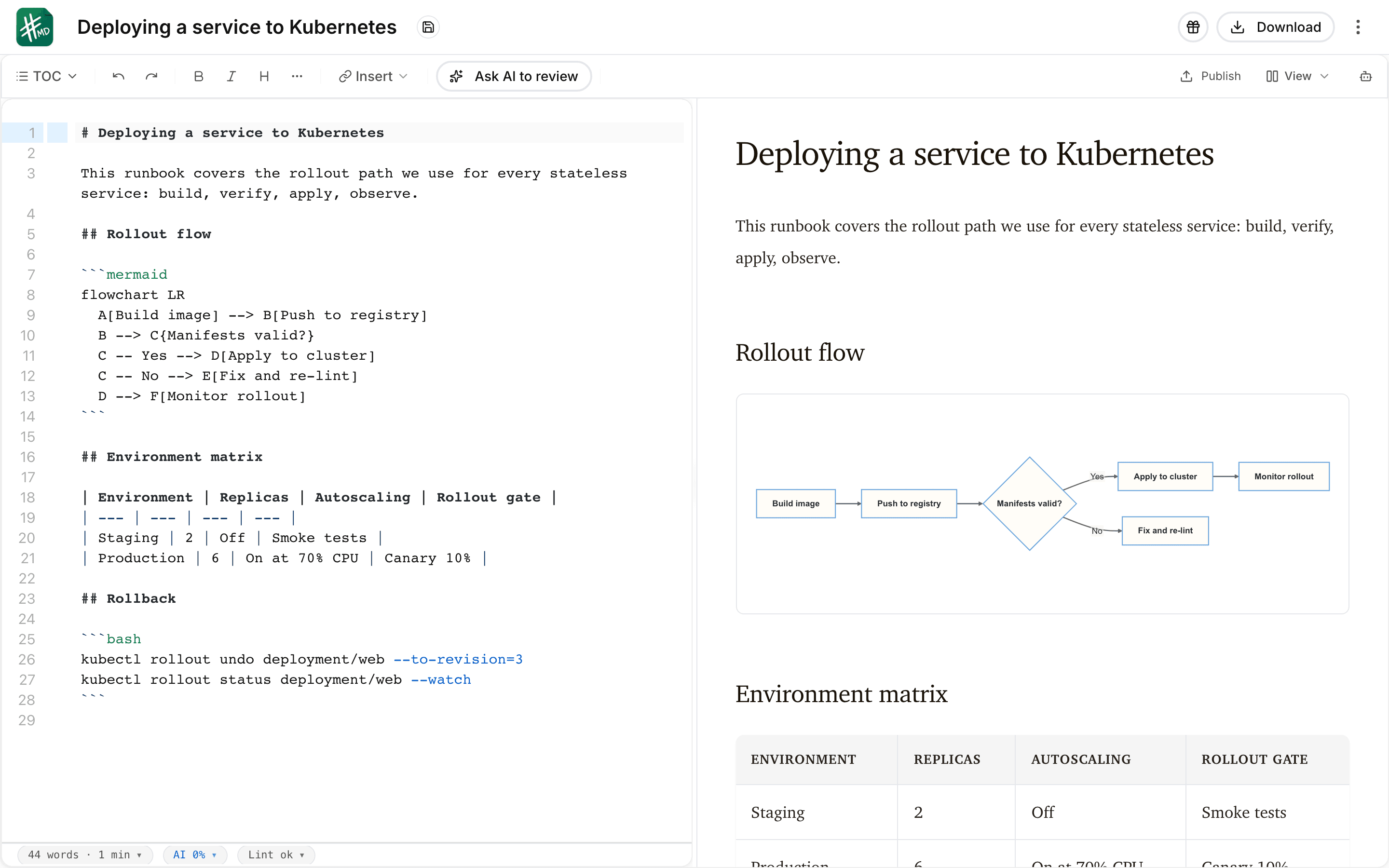
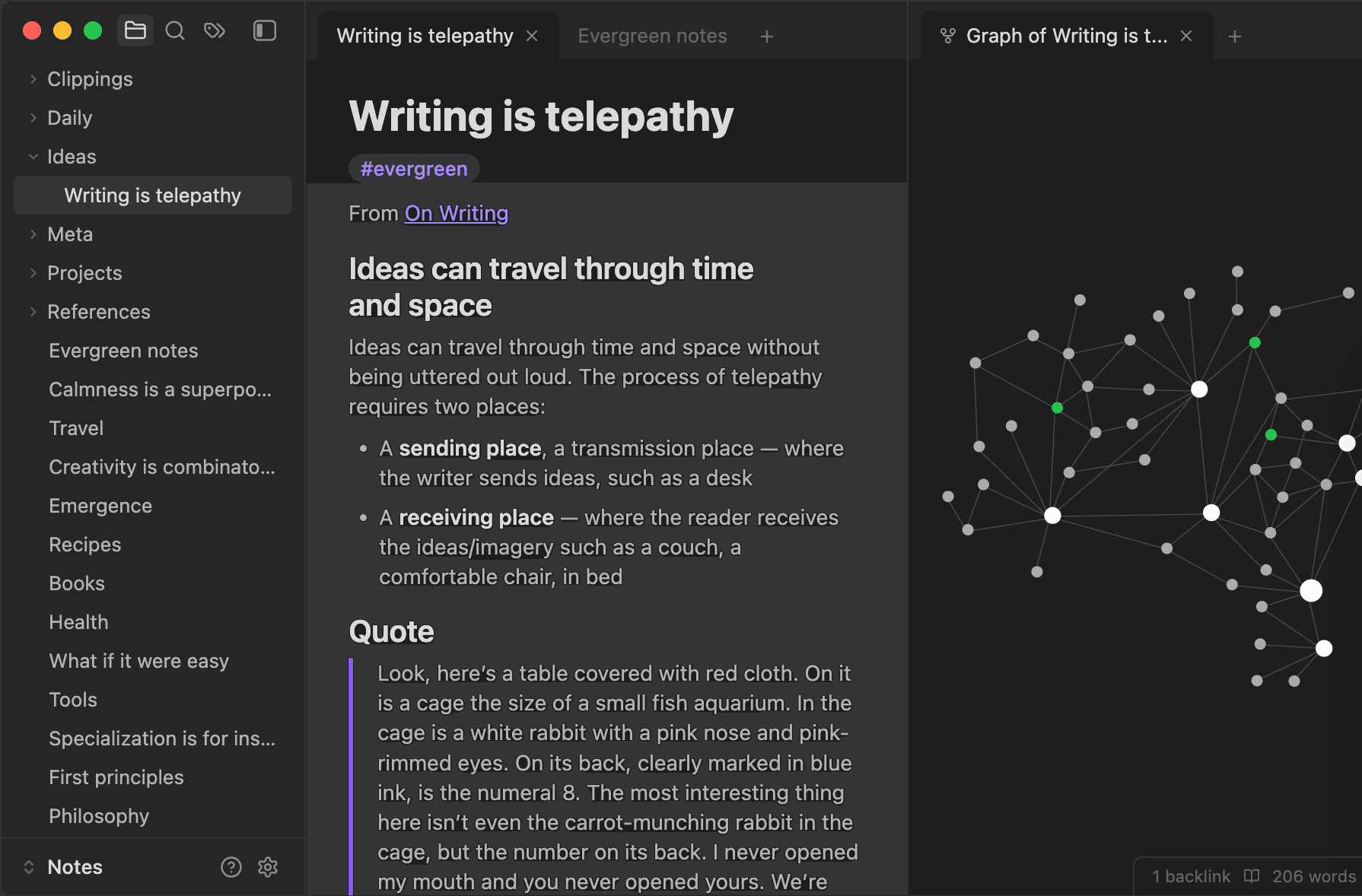
What each editor looks like with a document open. Every frame is cropped to the same shape, so the difference you see is the interface, not the picture.

mdedit.ai
The mdedit.ai editor with a deployment runbook open in split view: Markdown source with a bash code block on the left, and the live preview on the right rendering the document heading, a Mermaid flowchart, and a table.
Obsidianvia obsidian.md
The Obsidian app in its dark theme, showing a note open in the editor beside the graph view of linked notes.

Where do they differ?

Every price below is the one published on each product’s own pages. The full mdedit.ai tiers are on mdedit.ai pricing.

Primary model

mdedit.ai
Documents that ship. A technical-content workspace organized around documents, folders, review, export, and publishing.
Obsidian
A vault of notes. A Markdown editor and knowledge-base app organized around local folders called vaults.

Local ownership

mdedit.ai
Local-first, plus desktop. Local-first browser drafts and a desktop app that can work with local Markdown folders. Working with local Markdown folders.
Obsidian
Files on your disk. Markdown files live in a local vault, and Obsidian keeps its metadata cache in sync with them.

Knowledge connections

mdedit.ai
Folders and links. Folders, documents, links, and technical diagrams, with no knowledge-graph claim.
Obsidian
The whole point. Internal links, backlinks, graph-oriented knowledge work, Canvas, and community plugins are central strengths.

Collaboration and review

mdedit.ai
Live, with review states. Live same-document co-editing plus permissions, comments, suggestions, assignments, replies, and resolution. Sharing and collaboration.
Obsidian
Shared vaults via Sync. Every collaborator needs Sync; changes sync and merge, but live same-file cursors are not supported.

Apps and extensibility

mdedit.ai
Browser, desktop, mobile, CLI. Plus a VS Code extension and an MCP server that lets agents read and suggest changes. The VS Code extension.
Obsidian
Desktop, mobile, plugins. A large community plugin ecosystem and a public plugin API; Obsidian’s own pages do not describe a browser editor.

Cost and publishing

mdedit.ai
Free tier, then US$6.99. Standard is US$6.99 per month or US$39.99 per year and Premium is US$17.99 per month or US$129.99 per year, with hosted links plus configured external destinations. How publishing works.
Obsidian
Free core, paid add-ons. The core app is free without sign-up, and Sync and Publish are separately priced.

What each one gives up

Neither tool wins everywhere. These are the parts worth knowing before you commit.

  • mdedit.ai is not a personal-knowledge-management graph and does not try to replace Obsidian’s backlinks, graph, canvas, or plugin ecosystem.
  • Obsidian is free without sign-up and stores Markdown locally; paid Sync and Publish are optional services.
  • Obsidian shared vaults support team access through Sync, but its official help says same-file collaborative live editing is not currently supported.

Switching from Obsidian?

An Obsidian vault is a folder of Markdown files, and the mdedit.ai desktop app works with local Markdown folders, so a document can move between the two without leaving your machine.

  1. Point at the vault folder

    The notes are already plain Markdown. The desktop app opens the local folder, so nothing has to be uploaded to move one document across. How the desktop app works.

  2. Structure does not transfer

    mdedit.ai does not reproduce backlinks, graph view, Canvas, or plugins. Keep the vault for that work and move only the documents that have to be reviewed, exported, or published.

  3. In and out of Markdown

    The Markdown converters bring PDF, Word, HTML, PowerPoint, Excel, and EPUB source material in, and Pandoc-backed export writes PDF, DOCX, HTML, EPUB, and more on the way out. Markdown converters.

Common questions

Not currently. Shared vaults give a team access through Sync and changes merge, but Obsidian’s official help says same-file collaborative live editing is not supported, so two people in one note at once is a conflict to resolve rather than a supported flow. mdedit.ai supports live same-document co-editing with permissions.

The core app is free without sign-up, and Sync and Publish are separately priced optional add-ons. That makes the honest cost comparison depend on your workflow: solo and local stays free on Obsidian, while a shared or published document pulls in add-ons on one side or a plan on the other. The mdedit.ai free tier and paid tiers are on mdedit.ai pricing.

No. mdedit.ai is not a personal-knowledge-management graph and does not replicate backlinks, graph view, Canvas, or the plugin ecosystem. Plenty of people keep both: the vault for thinking, mdedit.ai for the documents that leave the vault and go through review, export, and publishing.

Seen enough? Open the editor and try it on a real document.

If mdedit.ai is the better fit for this document, the editor opens in your browser with no sign-up. If Obsidian is the better fit, the links on this page go straight to it.