Skip to content

Markdown files, or a block workspace?

mdedit.ai vs Notion for Markdown documents

Notion is the better home for a team wiki with databases attached to it, and mdedit.ai is the better home for a document whose deliverable is the Markdown file itself.

By Vivek Maskara · Last updated

mdedit.ai

Choose mdedit.ai when

The Markdown file is the thing you ship: it has to be version-controlled, exported through Pandoc, or published to a docs site, a repo, or a developer blog.

Try mdedit.ai without sign-up
Notion

Choose Notion when

You want one workspace for notes, wikis, databases, and project tracking, and Markdown is only how content occasionally enters and leaves it.

Visit Notion

At a glance

  • Markdown is the document

    mdedit.ai

    Yes, the file is the source

    Notion

    No, blocks with Markdown in and out

  • Runs in the browser

    mdedit.ai

    Yes, no sign-up needed

    Notion

    Yes, plus desktop and mobile apps

  • Live co-editing

    mdedit.ai

    Yes, same document

    Notion

    Yes, plus a suggest-edits mode

  • Mermaid diagrams

    mdedit.ai

    Yes, in the editor

    Notion

    Yes, inside a code block

  • Databases and wikis

    mdedit.ai

    No, folders and documents

    Notion

    Yes, the core of the product

  • Publishing

    mdedit.ai

    Hosted links and destinations

    Notion

    notion.site; custom domain is paid

  • Price

    mdedit.ai

    Free tier, paid from US$6.99 a month

    Notion

    Free plan, paid from US$10 a seat

  • Platforms

    mdedit.ai

    • Web
    • macOS
    • Windows
    • Linux

    Notion

    • Web
    • macOS
    • Windows
    • Mobile

See them side by side

What each editor looks like with a document open. Every frame is cropped to the same shape, so the difference you see is the interface, not the picture.

mdedit.ai
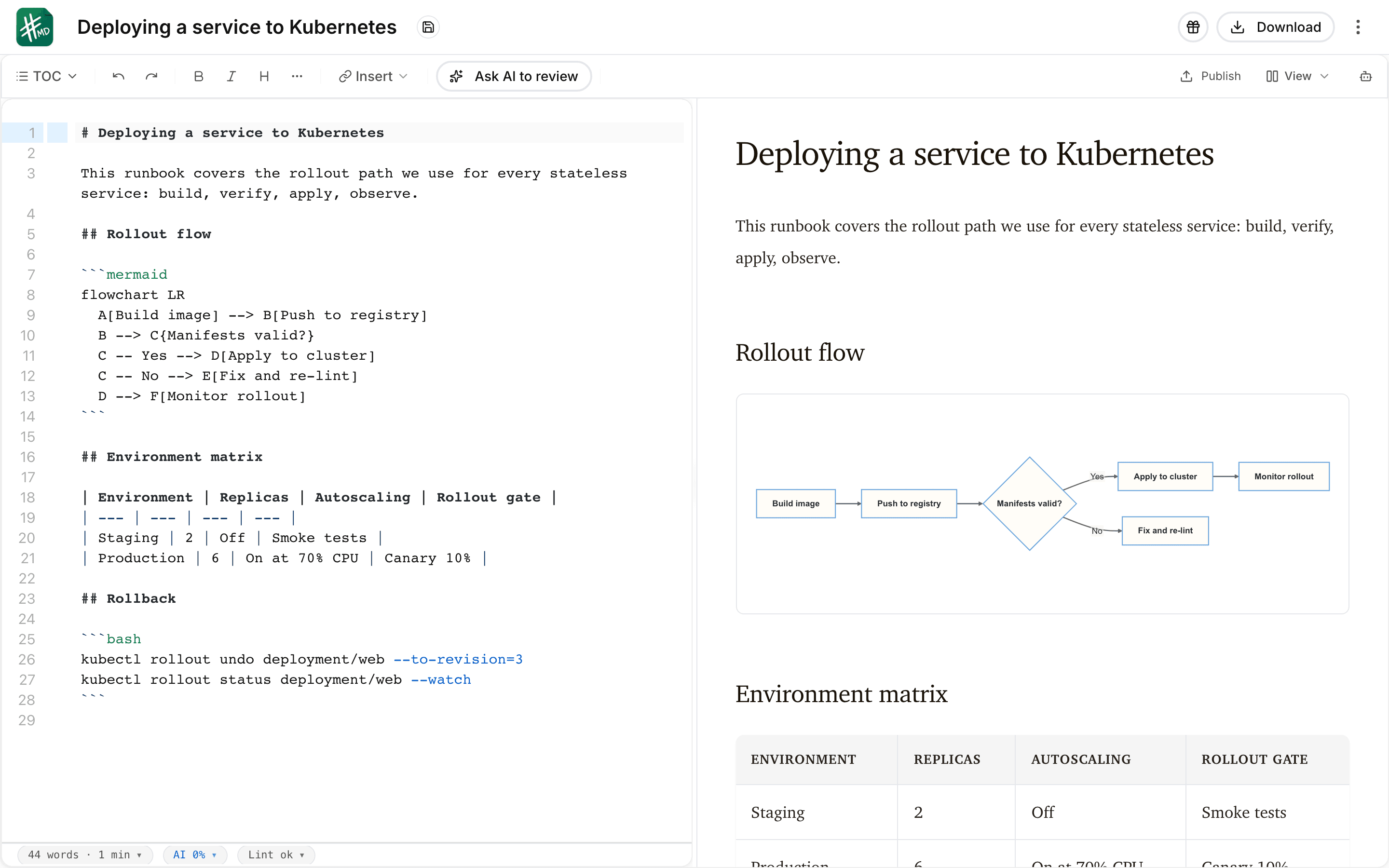
The mdedit.ai editor with a deployment runbook open in split view: Markdown source with a bash code block on the left, and the live preview on the right rendering the document heading, a Mermaid flowchart, and a table.
Notionvia notion.com
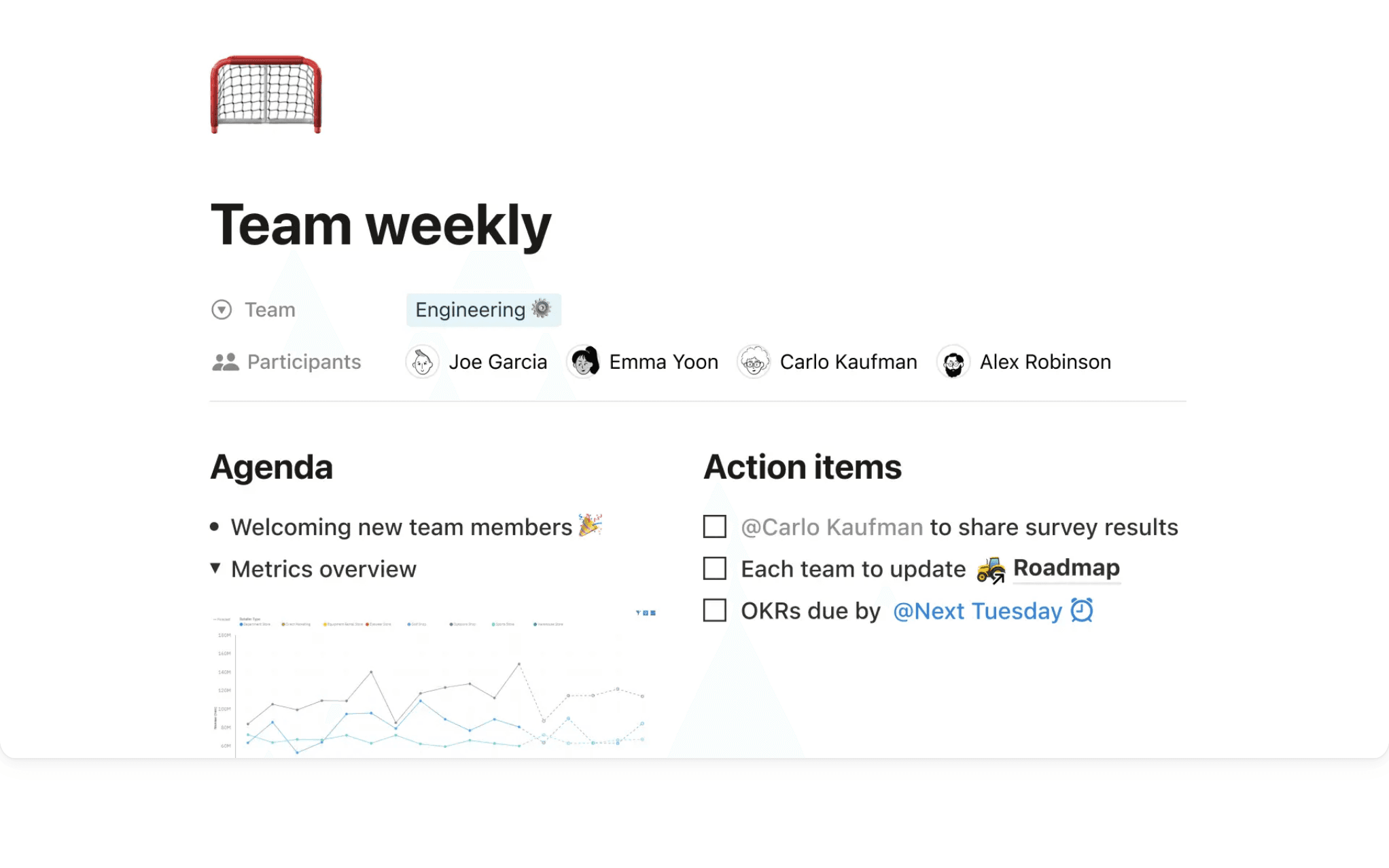
A Notion page titled “Team weekly” with an emoji page icon, Team and Participants properties across the top, and two columns of blocks below: an Agenda list with a toggle containing an embedded line chart, and an Action items checklist with person and date mentions.

Where do they differ?

Every price below is the one published on each product’s own pages. The full mdedit.ai tiers are on mdedit.ai pricing.

Primary model

mdedit.ai
Markdown documents. A technical-content workspace organized around Markdown files, folders, review, export, and publishing.
Notion
An all-in-one workspace. A block-based workspace for notes, wikis, databases, and projects, where a page is a tree of blocks rather than a text file.

What the document actually is

mdedit.ai
A Markdown file. The document is Markdown source, so what you edit is what you commit, export, or hand to another tool. Working with local Markdown folders.
Notion
Blocks, converted on the way out. Markdown is an import and export format rather than the stored form. Notion’s export help notes that callout blocks are written out as HTML because Markdown has no equivalent, and its import help notes that anchor links and nonstandard Markdown extensions may not import cleanly.

Structure

mdedit.ai
Folders and documents. Folders, documents, links, and technical diagrams, with no database, view, or wiki layer.
Notion
Databases and views. Databases with table, board, calendar, and gallery views, relations, templates, and a large template ecosystem are central strengths.

Collaboration and review

mdedit.ai
Live, with review states. Live same-document co-editing plus permissions, comments, suggestions, assignments, replies, and resolution. How comments and suggestions work.
Notion
Live, with suggested edits. Real-time editing, comments, and a Suggest edits mode that needs comment access or higher; per Notion’s help, suggestions work on text, headings, and list blocks, not on inline databases or database properties.

AI workflow

mdedit.ai
Changes you can inspect. Included AI, bring-your-own provider keys, or local models on the desktop app. AI writing in the editor.
Notion
Notion AI across the workspace. Chat, generation, autofill, and translation spanning pages and databases, with custom agents sold on top and billed in Notion credits.

Export and publishing

mdedit.ai
Pandoc out, converters in. Pandoc-backed export writes PDF, DOCX, HTML, EPUB and more, and publishing covers hosted links plus configured external destinations. How publishing works.
Notion
PDF, HTML, Markdown, CSV. Pages export to PDF, HTML, or Markdown and CSV, and publish to a notion.site domain. Site slugs, themes, SEO fields, and custom domain add-ons need a paid plan.

Apps and extensibility

mdedit.ai
Browser, desktop, mobile, CLI. Plus a VS Code extension and an MCP server that lets agents read and suggest changes. The VS Code extension.
Notion
Browser, desktop, mobile, API. A public API, a wide integration catalogue, and a template marketplace built around the block model.

Cost

mdedit.ai
Free tier, then US$6.99. Standard is US$6.99 per month or US$39.99 per year and Premium is US$17.99 per month or US$129.99 per year.
Notion
Free plan, then US$10 a seat. Notion’s pricing page shows a free plan, Plus at US$10 per member per month, and Business at US$20 per member per month, with up to 20 percent off when billed yearly; Enterprise is custom.

What each one gives up

Neither tool wins everywhere. These are the parts worth knowing before you commit.

  • mdedit.ai is not an all-in-one workspace. It has no databases, no board or calendar views, no wikis, and no project tracking, and it does not try to replace them.
  • Notion supports Markdown shortcuts while you type, imports Markdown files, exports Markdown and CSV, and renders Mermaid inside code blocks, so this is not a comparison about whether Notion can handle Markdown at all.
  • Notion pages can be viewed, edited, and created offline in the desktop and mobile apps, and on Business and Enterprise plans recent and favorited pages are downloaded automatically.

Switching from Notion?

Notion exports Markdown and CSV, so moving a page across is an export and an import rather than a rebuild, but the parts of a Notion page that are not prose do not survive the trip unchanged.

  1. Export the pages as Markdown

    Notion’s export offers Markdown and CSV. Non-database pages come out as Markdown files, subpages come out as separate files when subpages are included, and full-page databases come out as CSV.

  2. Expect some blocks to change shape

    Notion’s own export help says callout blocks are written out as HTML because Markdown has no equivalent, and databases arrive as CSV rather than as tables inside the document. That is a one-time clean-up, and the converters handle source material arriving in other formats. Markdown converters.

  3. Keep Notion for what is not a document

    Wikis, trackers, and databases have no equivalent here. Moving the documents that get reviewed, exported, and published is the useful half of the migration, and plenty of teams run both.

Common questions

Yes, in three places. Notion supports Markdown shortcuts while you type, it imports Markdown files, and it exports Markdown and CSV. It also renders Mermaid inside code blocks. What it does not do is store the page as Markdown: a Notion page is a tree of blocks, and Markdown is the format it converts to on the way in and out. That difference only matters when the Markdown file itself is the deliverable.

Notion’s export help says callout blocks are written out as HTML because Markdown has no equivalent, and full-page databases export as CSV rather than as tables in the document. Going the other way, Notion’s import help says anchor links and nonstandard Markdown extensions may not import cleanly. Round-tripping a document through Notion is therefore lossy at the edges, which is the practical argument for keeping the Markdown file as the source.

No. mdedit.ai has no databases, board or calendar views, wikis, or project tracking, and it does not try to replace them. It replaces the part of Notion where a document is drafted, reviewed, exported, and published. Plenty of teams keep both: Notion for the wiki and the trackers, mdedit.ai for the documents that leave the workspace.

It depends on the seat count and what you need. Notion has a free plan, and its pricing page shows Plus at US$10 per member per month and Business at US$20 per member per month, with up to 20 percent off when billed yearly and Enterprise on custom pricing. mdedit.ai has a free tier and a no-sign-up scratchpad, with Standard at US$6.99 per month and Premium at US$17.99 per month; the tiers are on mdedit.ai pricing.

Seen enough? Open the editor and try it on a real document.

If mdedit.ai is the better fit for this document, the editor opens in your browser with no sign-up. If Notion is the better fit, the links on this page go straight to it.