Skip to content

Two browser Markdown editors built for sharing

mdedit.ai vs HackMD for collaborative Markdown

HackMD is the better fit for a team or community that wants a shared Markdown notebook with public notes, GitHub sync, and an API for agents, and mdedit.ai is the better fit when a document needs review states, Pandoc export, and a desktop app that opens local folders.

By Vivek Maskara · Last updated

mdedit.ai

Choose mdedit.ai when

The document has to be reviewed, exported to PDF or Word, or published, and you want the same workspace to continue in a desktop app on local Markdown folders.

Try mdedit.ai without sign-up
HackMD

Choose HackMD when

You want a shared Markdown notebook for a team or community, with public notes, GitHub sync, and a REST API and CLI for feeding notes to agents.

Visit HackMD

At a glance

  • Runs in the browser

    mdedit.ai

    Yes, no sign-up needed

    HackMD

    Yes, new notes open without sign-in

  • Desktop app

    mdedit.ai

    Yes, opens local folders

    HackMD

    No desktop app documented

  • Live co-editing

    mdedit.ai

    Yes, with permissions

    HackMD

    Yes, with multiple cursors

  • Comments and suggestions

    mdedit.ai

    Plus assignments and resolution

    HackMD

    Comments, mentions, suggest edit

  • Mermaid and math

    mdedit.ai

    Yes, in the editor

    HackMD

    Yes, in the live preview

  • GitHub

    mdedit.ai

    Publishes to GitHub

    HackMD

    Sync; 20 pushes a month on Free

  • Agent access

    mdedit.ai

    Hosted MCP server and CLI

    HackMD

    REST API and CLI return Markdown

  • Price

    mdedit.ai

    Free tier, paid from US$6.99 a month

    HackMD

    Free plan, Prime from US$4 a month

  • Platforms

    mdedit.ai

    • Web
    • macOS
    • Windows
    • Linux

    HackMD

    • Web

See them side by side

What each editor looks like with a document open. Every frame is cropped to the same shape, so the difference you see is the interface, not the picture.

mdedit.ai
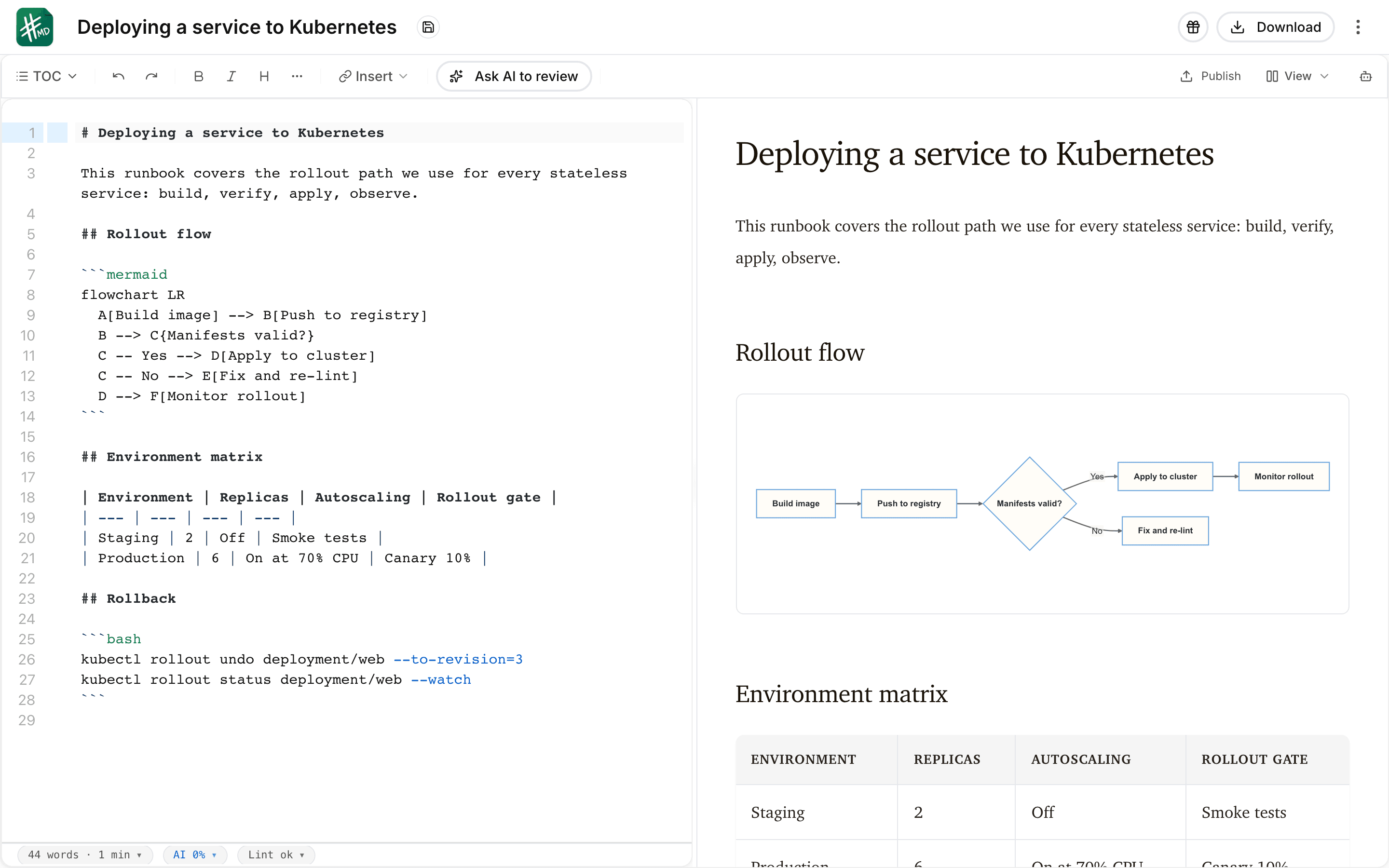
The mdedit.ai editor with a deployment runbook open in split view: Markdown source with a bash code block on the left, and the live preview on the right rendering the document heading, a Mermaid flowchart, and a table.
HackMDvia hackmd.io
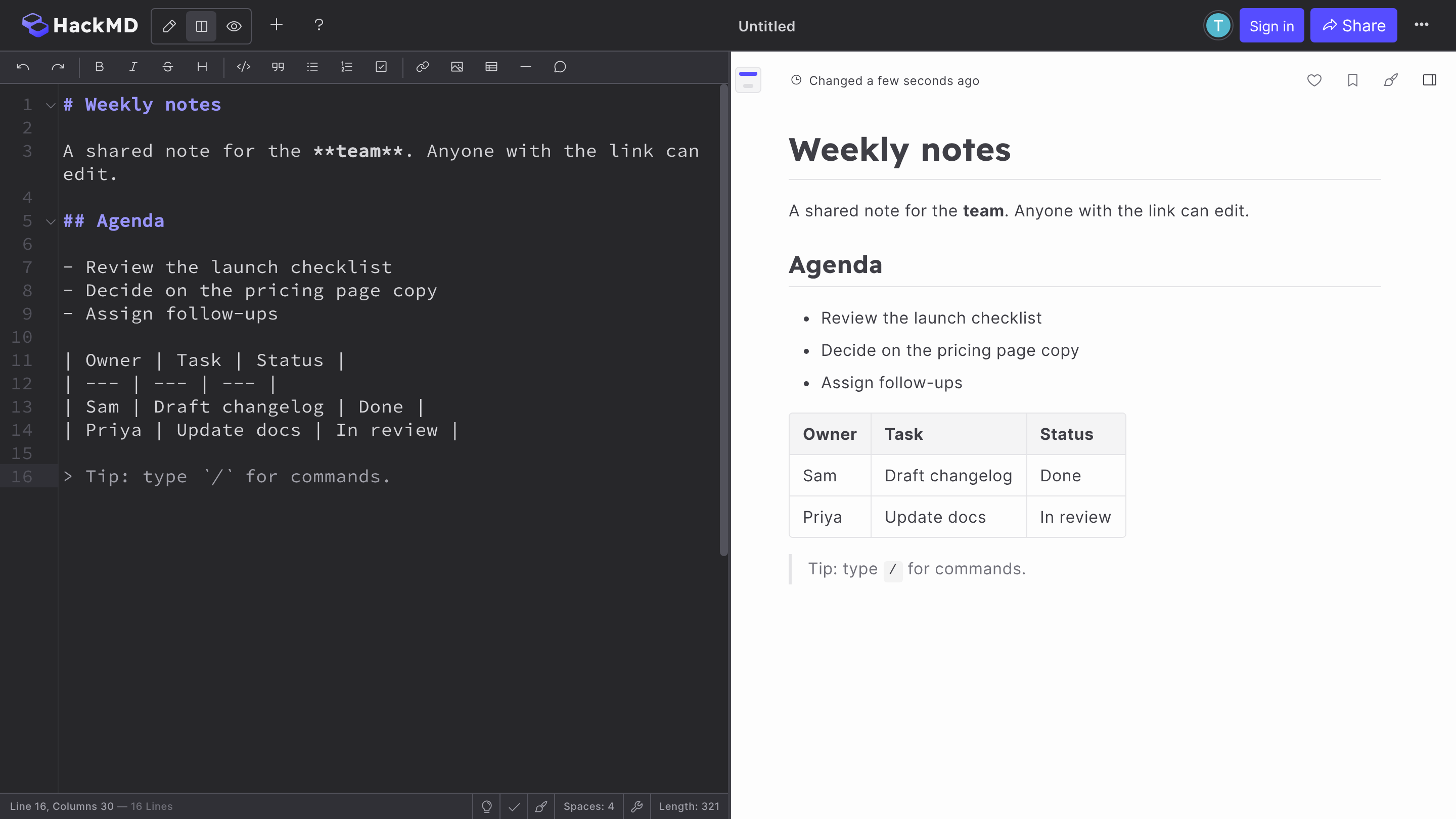
The HackMD browser editor in split view with a note titled “Weekly notes”: Markdown source with a formatting toolbar on the left, and the rendered preview on the right showing a heading, an agenda list, a table, and a quote.

Where do they differ?

Every price below is the one published on each product’s own pages. The full mdedit.ai tiers are on mdedit.ai pricing.

Primary model

mdedit.ai
Browser plus desktop. A browser workspace with an optional local-first desktop app that opens local Markdown folders.
HackMD
A shared Markdown workspace. Real-time Markdown collaboration for teams, communities, projects, and docs, with team workspaces and public notes.

Starting a document

mdedit.ai
No sign-up to start. The scratchpad opens straight into the editor, and a draft can move into a workspace or the desktop app later. How the desktop app works.
HackMD
A note opens without sign-in. hackmd.io/new opens an editor with Sign in and Share buttons, and offers sign-in for importing from GitHub and for team features.

Collaboration and review

mdedit.ai
Live, with review states. Live co-editing with permissions, plus comments, suggestions, assignments, replies, and resolution. How comments and suggestions work.
HackMD
Live, with comments and suggestions. Real-time editing with multiple cursors, in-line and page commenting, mentions, version history, and a Suggest edit mode that is included on the Free plan.

Markdown and visuals

mdedit.ai
GFM plus diagrams. A GFM-oriented preview with math, Mermaid, Graphviz, Markmap, and dedicated conversion tools.
HackMD
Math and Mermaid in the preview. Math and Mermaid blocks render in the live preview, alongside embeds and a built-in slide mode.

Sync and version history

mdedit.ai
Local-first, then cloud. Local-first drafts, account workspaces, cloud sync, and local desktop folders.
HackMD
GitHub sync and version history. Notes push to GitHub, 20 times a month on Free and unlimited on Prime, with recent 10 versions kept on Free and unlimited versions on Prime. GitLab integration is an Enterprise feature.

AI and agents

mdedit.ai
Changes you can inspect. Included AI, bring-your-own provider keys, or local models on the desktop app, plus an MCP server for agents. AI writing in the editor.
HackMD
Notes as Markdown for agents. A REST API and CLI pull and push notes as Markdown for tools such as Claude Code and Cursor, with 400 API calls a month on Free and 10,000 on personal Prime.

Export and publishing

mdedit.ai
Pandoc out, converters in. Pandoc-backed export writes PDF, DOCX, HTML, EPUB and more, and publishing covers hosted links plus configured external destinations. How publishing works.
HackMD
Published notes, PDF on Prime. Notes can be published and shared as public pages, and PDF export is listed as a Prime feature.

Cost

mdedit.ai
Free tier, then US$6.99. Standard is US$6.99 per month or US$39.99 per year and Premium is US$17.99 per month or US$129.99 per year.
HackMD
Free plan, then US$4 or US$5 a seat. HackMD’s pricing page shows a free plan and Prime at US$4 per month for one person on yearly billing, or US$5 per seat per month billed annually for a team; Enterprise is by request.

What each one gives up

Neither tool wins everywhere. These are the parts worth knowing before you commit.

  • HackMD is a real-time collaborative Markdown product with comments, a Suggest edit mode, version history, GitHub sync, and an API, so calling it a basic or single-user editor would be inaccurate.
  • HackMD’s Free plan is capped, with up to three invitees, three custom templates, 1 MB images, 20 GitHub pushes a month, and 400 API calls a month; Prime lifts those limits, and Enterprise adds SSO, role-based access control, and a custom domain.
  • HackMD also runs a public community of notes, which its homepage sizes at more than 7.7 million notes created, and this comparison does not weigh that discovery layer.
  • HackMD’s public pages do not describe a desktop app, so this comparison treats that as undocumented rather than unsupported.

Switching from HackMD?

HackMD notes are Markdown, so moving a note across is a copy of the text rather than a conversion, but HackMD-specific blocks may not render the same way elsewhere.

  1. Copy the note as Markdown

    HackMD describes every note as Markdown, and its REST API and CLI can pull a note as Markdown, so the text can go straight into an mdedit.ai document or a local folder the desktop app opens. How the desktop app works.

  2. Check the HackMD-specific blocks

    Embeds and slide mode are built into HackMD, so check any note that uses them after pasting. Source material that arrives as PDF, Word, or HTML comes in through the converters first. Markdown converters.

  3. Keep HackMD for public notes if you use them

    Notes you publish to the HackMD community, or sync to a GitHub repository there, can stay where they are. Moving the documents that get reviewed, exported, and published is the useful half of the migration.

Common questions

Yes, there is a free plan with unlimited notes, up to three invitees, three custom templates, Suggest edit, GitHub integration with 20 pushes a month, and images up to 1 MB. Prime is listed at US$4 per month for one person on yearly billing and US$5 per seat per month billed annually for a team, and adds full-text search, PDF export, unlimited versions, and unlimited invites. mdedit.ai has a free tier and a no-sign-up scratchpad, with the paid tiers on mdedit.ai pricing.

Not to start a note: hackmd.io/new opens an editor straight away with Sign in and Share buttons. Signing in is how you import from GitHub, use team features, and keep notes under your own profile. mdedit.ai also opens a no-sign-up scratchpad, which can carry on into a workspace or the desktop app later.

Yes. HackMD describes real-time editing with multiple cursors, in-line and page commenting, mentions, and version history, and its Suggest edit mode is on the Free plan. The difference is less about whether either can co-edit and more about what surrounds it: mdedit.ai adds permissions, assignments, replies, and resolution to the same document, and HackMD adds public notes and GitHub sync.

For a document that is drafted, reviewed, exported, and published, yes. It does not replace HackMD’s public community of notes, its team workspaces with role-based access on Enterprise, or its GitHub-synced note repositories. Teams that use both usually keep HackMD for the shared notebook and mdedit.ai for the documents that leave it.

Seen enough? Open the editor and try it on a real document.

If mdedit.ai is the better fit for this document, the editor opens in your browser with no sign-up. If HackMD is the better fit, the links on this page go straight to it.